 DOCNITION AI
Docnition AI turns case files, contracts, underwriting guidelines, and claims notes into instant, source-linked answers—so teams stop digging through folders and PDFs.
Close cases & claims faster—while you’re still on the call
Instantly pull the right clause, policy, precedent, or claim detail with citations—so teams resolve issues in minutes (not days) and reduce handling costs.
Secure access to every case & claim document—instantly
Pull contracts, case files, policies, endorsements, and claim notes in seconds during a live call. Keep access controlled so the right people see the right information—nothing more.
Role-based access controlsMatter / claim-level organizationFast search across PDFs + folders
Source-linked answers you can verify on the spot
Ask questions like “Is this covered?” or “What does this clause mean?” Docnition responds with a clear summary plus citations to the exact passage—so you can confirm quickly and move the claim or matter forward without callbacks.
Citations & page referencesHighlighted supporting passagesCopy-ready notes for emails/files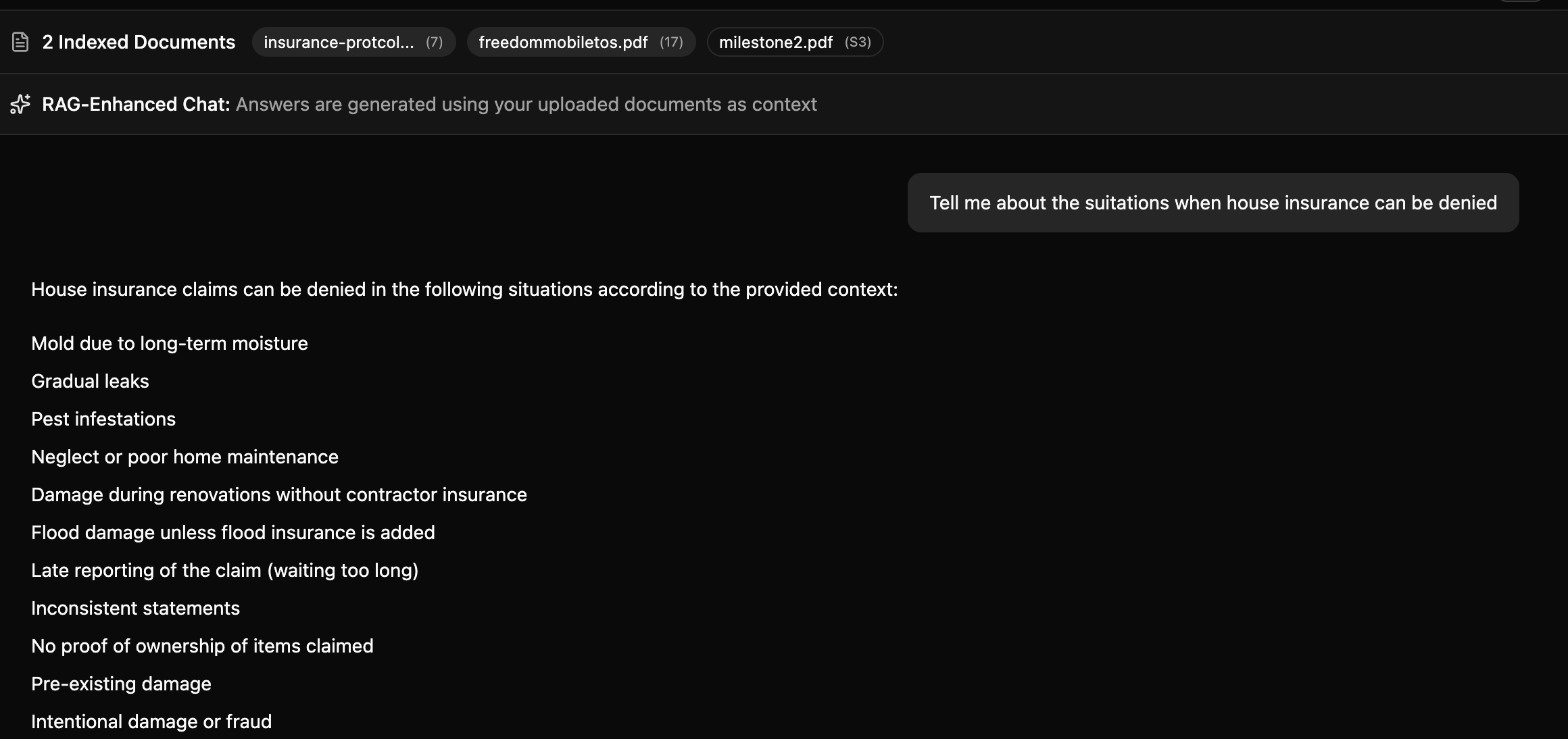
Resolve Claims & Matters Faster with Docnition AI
Retrieve policy language, clauses, and case details in seconds—with citations—so your team can answer confidently on live calls and reduce follow-ups.

Matter / Claim Document Library
Upload and manage policies, contracts, case files, claim notes, and supporting documents in one secure library—organized by matter or claim.

Citations & Page References
Every answer links to the exact page and passage, so teams can verify quickly—especially during live calls.

Fast Search Across Documents
Search across folders, PDFs, and notes to find clauses, exclusions, endorsements, and key case details in seconds.

Enterprise-Grade Security
Encrypted in transit and at rest, with secure storage designed for sensitive legal and claims documentation.
Role-Based Access + Ethical Walls
Keep permissions intact so users only see what they’re allowed to see—supporting matter/claim boundaries and sensitive access controls.
Integrations (Upcoming)
Connect to SharePoint, Google Drive, and common knowledge bases. More integrations coming as we onboard early users.
Answer confidently on live calls—with citations
Retrieve policy language, clauses, and key claim or matter details in seconds—backed by source links—so your team reduces callbacks, speeds resolution, and lowers handling costs.

Answers to the questions teams ask every day
Security, accuracy, permissions, and how Docnition works—without the jargon.
- What is Docnition AI?
Docnition AI is a document intelligence platform for law firms and insurance teams. It helps you search across contracts, case files, policies, endorsements, and claim notes—and get fast answers backed by your own documents.
- How does Docnition AI work?
You upload or connect your documents, then ask a question in plain English. Docnition retrieves the most relevant passages and returns a clear answer with citations, so you can verify information instantly.
- Do answers include citations?
Yes. Each response includes source citations (and supporting passages where available) so you can confirm the information quickly—especially during live client or claimant calls.
- Does Docnition AI respect permissions?
Yes. Docnition is designed to keep access controlled so users only see the documents they’re authorized to view. This helps support matter/claim boundaries and keeps sensitive information protected.
- What types of documents can I upload?
PDFs, Word files, emails, scanned documents, images, spreadsheets, policies, endorsements, contracts, pleadings, claim notes, and underwriting guidelines.
- Can Docnition AI answer questions across multiple documents?
Yes. Docnition can combine information across multiple documents—like a policy + endorsement + adjuster notes—and produce one answer with citations to each supporting source.
- Can I delete or update documents after uploading?
Yes. You can add, remove, and replace documents anytime. Updates are reflected in search results and answers so responses stay current.
- Is my data secure?
Yes. Your data is encrypted in transit and at rest. Access can be restricted by user/team, and your documents are not used to train public models.
- Do I need technical skills to use Docnition AI?
No. Docnition is built for non-technical teams. Upload/connect documents, then start searching and asking questions—no complex setup required.
- Does Docnition AI integrate with other platforms?
We’re building integrations for SharePoint, Google Drive, and common knowledge bases so teams can search documents where they already live.
- Who is Docnition AI built for?
Claims teams, underwriting, legal ops, paralegals, associates, and compliance/QA—anyone who needs fast, verifiable answers from large volumes of documents.
- Can Docnition help my team respond faster during live calls?
Yes. Docnition is designed for fast lookups—so teams can retrieve policy language, clauses, and key claim/matter details in seconds with citations. This reduces callbacks, speeds resolution, and helps lower handling costs.